

这是一个创建于 262 天前的主题,其中的信息可能已经有所发展或是发生改变。
插件介绍
我们的官网静态站点 https://flashcat.cloud 是用 hugo 搭建的,站点里的页面都是使用 markdown 格式编辑的,尤其是博客和文档页面。页面一开始的部分如下所示:
title: "this is title" description: "" keywords: ["vscode"] author: "巴辉特" date: "2025-03-28T15:16:11.007+08:00" lastmod: "2025-03-28T15:25:37.094+08:00" 为了 SEO 友好,每次新建页面的时候要配置 date 字段,每次修改页面的时候,又要更新 lastmod 字段为当前时间,每次手动输入这个时间有点麻烦,所以我写了一个 vscode 插件,方便在 hugo markdown 中输入 ISO 8601 格式的时间。如果你也需要,在 vscode 插件市场搜索 insertisodate,就能找到这个插件了。
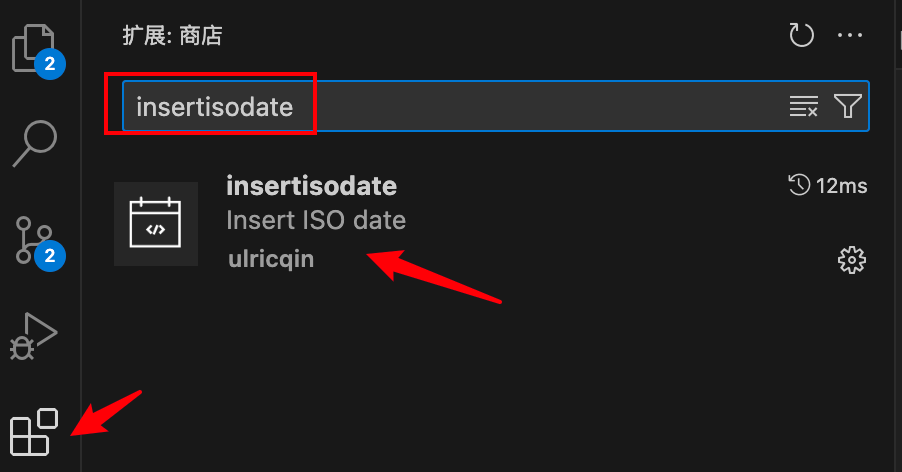
使用方法也很简单,在你想要输出时间的地方,按下 Command + Shift + P( Windows 下面可能是 Ctrl + Shift + P ),输入 Insert ISO Date,就能插入当前时间了。
插件原理
插件编写非常简单,我是参考这个文章走通的整个流程。核心代码如下:
// The module 'vscode' contains the VS Code extensibility API // Import the module and reference it with the alias vscode in your code below const vscode = require('vscode'); function formatCurrentTime() { const currentTime = new Date(); const year = currentTime.getFullYear(); const mOnth= String(currentTime.getMonth() + 1).padStart(2, '0'); const day = String(currentTime.getDate()).padStart(2, '0'); const hours = String(currentTime.getHours()).padStart(2, '0'); const minutes = String(currentTime.getMinutes()).padStart(2, '0'); const secOnds= String(currentTime.getSeconds()).padStart(2, '0'); const millisecOnds= String(currentTime.getMilliseconds()).padStart(3, '0'); const timezOneOffset= -currentTime.getTimezoneOffset(); const timezOneHours= String(Math.floor(Math.abs(timezoneOffset) / 60)).padStart(2, '0'); const timezOneMinutes= String(Math.abs(timezoneOffset) % 60).padStart(2, '0'); const timezOneSign= timezoneOffset >= 0 ? '+' : '-'; const timezOne= `${timezoneSign}${timezoneHours}:${timezoneMinutes}`; return `${year}-${month}-${day}T${hours}:${minutes}:${seconds}.${milliseconds}${timezone}`; } // This method is called when your extension is activated // Your extension is activated the very first time the command is executed /** * @param {vscode.ExtensionContext} context */ function activate(context) { // Use the console to output diagnostic information (console.log) and errors (console.error) // This line of code will only be executed once when your extension is activated console.log('Congratulations, your extension "insertisodate" is now active!'); // The command has been defined in the package.json file // Now provide the implementation of the command with registerCommand // The commandId parameter must match the command field in package.json const disposable = vscode.commands.registerCommand('insertisodate.insert', function () { let editor = vscode.window.activeTextEditor; if (!editor) { return; } // get current date let dateString = formatCurrentTime(); editor.edit(function (text) { // get current selection let selection = editor.selection; if (!selection.isEmpty) { // Replace selected text with dateString text.replace(selection, dateString); } else { // Insert dateString at current cursor position let startLine = selection.start.line; let startCharacter = selection.start.character; text.insert(new vscode.Position(startLine, startCharacter), dateString); } }); }); context.subscriptions.push(disposable); } // This method is called when your extension is deactivated function deactivate() { } module.exports = { activate, deactivate } 其中,formatCurrentTime 是一个工具方法,让 ChatGPT 生成的,其他代码是插件框架代码,由框架脚手架生成的,最核心的逻辑是下面几行代码:
// get current date let dateString = formatCurrentTime(); editor.edit(function (text) { // get current selection let selection = editor.selection; if (!selection.isEmpty) { // Replace selected text with dateString text.replace(selection, dateString); } else { // Insert dateString at current cursor position let startLine = selection.start.line; let startCharacter = selection.start.character; text.insert(new vscode.Position(startLine, startCharacter), dateString); } }); 这段代码的意思是,如果当前有选中的文本,就用当前时间替换掉选中的文本;如果没有选中的文本,就在光标处插入当前时间。这样就能实现我们想要的功能了。这个项目的代码我放到 github 上了,地址如下
https://github.com/sretalk/insertisodate
Enjoy!

 Select Language