

这是一个创建于 2073 天前的主题,其中的信息可能已经有所发展或是发生改变。
OS:ubuntu 16 查了很多资料,重启后,还是不能开机启动。
/etc/init.d/tomcat chmod +x /etc/init.d/tomcat update-rc.d tomcat defaults 能正常使用 service tomcat start|stop
#!/bin/sh ### BEGIN INIT INFO # Provides: tomcat # Required-Start: $remote_fs $network # Required-Stop: $remote_fs $network # Default-Start: 2 3 4 5 # Default-Stop: 0 1 6 # Short Description: the tomcat Java Application Server ### END INIT INFO export JAVA_HOME=/opt/jdk1.8.0_231 export JRE_HOME=$JAVA_HOME/jre export PATH=$PATH:$JAVA_HOME/bin export CLASSPATH=. export CATALINA_HOME=/opt/tomcat/ case "$1" in start) ${CATALINA_HOME}/bin/startup.sh echo 'tomcat start success' exit 0 ;; stop) ${CATALINA_HOME}/bin/shutdown.sh echo 'tomcat stop success' 略 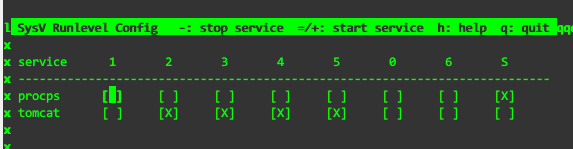
 | 1 julyclyde 2020 年 5 月 8 日 ubuntu 16 用的是 systemd 你咋查的? |
 | 2 KyonLi 2020 年 5 月 8 日 |

 | 4 yyyb 2020 年 5 月 8 日 用 systemctl |
 | 5 jinliming2 2020 年 5 月 8 日 systemctl enable tomcat 设置开机启动啊 systemctl start ... systemctl stop ... systemctl status ... systemctl restart ... systemctl reload ... service 命令好早前就不用了 |
 | 6 mgrddsj 2020 年 5 月 9 日 用 systemctl 来管理,最好用 Google + 英文搜索,中文的 Linux 相关的知识很多都已过期。 搜索关键词:systemctl autostart |
 | 7 CheekiBreeki 2020 年 5 月 9 日 via Android systemctl |
 Select Language